Assignment: LLM Inference Speedrun
Out: 08/28 · Due: 09/16, 11:59 PM ET · Weight: 20%
Table of contents
FAQs
This section will be updated as questions come in on the course forum. Check here before posting.
- This is an individual assignment.
- My spot GCP VM keeps getting preempted. Spot T4 preemption is noticeably frequent on weekdays. If your instance is being preempted multiple times a day, switch to an on-demand instance instead — it costs more per hour but cannot be preempted. Zone availability varies; we have had success finding T4 capacity in
us-central1andeurope-central2-b. - Every zone I try says it has no T4 capacity. T4 stockouts across many zones at once do happen. An AI coding agent is very efficient at this hunt — it can sweep every T4 zone worldwide with retries and snapshot/recreate your VM in whichever zone has capacity — so consider prompting an agent to find and reserve a reliable cloud T4 (on-demand or spot) on your behalf.
- Does my submission tarball need a specific filename? No — any filename works (the dashboard renames it on upload). What is enforced: it must be a gzip-compressed tar (
.tar.gz/.tgz), andstart_server.shmust sit at the archive root, not inside a folder. Beware the classic mistake:tar -czf sub.tar.gz my_project/nests everything undermy_project/and fails validation — instead runtar -czf sub.tar.gz start_server.sh server.py ...from inside your project directory (or use-C my_project .). - Tar ball submission updated: The tar ball should be submitted to both the grading service dashboard and Canvas.
Overview
You are given a fixed language model, Qwen/Qwen3-4B-Instruct-2507, and a deliberately naive OpenAI-compatible inference server. Your job is to make serving this model on a single NVIDIA T4 (16 GB) as fast as you can. You own the entire serving stack: HTTP handling, request scheduling, batching, KV-cache management, quantization, GPU kernels, speculative decoding — replace any of it, or all of it.
This is the core engineering loop of every production LLM serving system (vLLM, SGLang, TGI, TensorRT-LLM), compressed to a scale where one person can build it in weeks on a free GPU, with the help of AI coding agents. The classic optimizations each map to a measurable scenario, so you will see each technique pay off:
| Technique | What it moves |
|---|---|
| Continuous / wave batching | burst throughput (the single biggest win: the naive server serializes concurrent requests) |
| CUDA graphs, static KV cache, kernel fusion | single-stream decode latency (the naive server wastes ~3× on launch overhead) |
| Weight quantization (INT4/INT8) | decode latency (T4 decode is memory-bandwidth-bound: ~25 ms/token floor at FP16) |
| Prefill engineering (attention kernels, int8 tensor cores) | time-to-first-token on long prompts |
| Speculative decoding | single-stream latency — from train-free prompt-lookup up to draft-model verification (bring your own drafter; see Speculative decoding below) |
| Your own invention | whatever you can prove it moves. This list is where the field currently is, not where it ends. An idea that appears on no list, works on this hardware, and survives your own ablations is the best thing this assignment can produce |
You may not use existing serving engines (vLLM, SGLang, TGI, TensorRT-LLM, llama.cpp, ExLlama, etc.). The grading environment contains only a pinned lightweight stack — torch (+ triton), transformers, tokenizers, safetensors, accelerate, numpy, fastapi, uvicorn, httpx — plus the CUDA toolchain (nvcc, ninja) to compile your own kernels. Submissions are source-only; there is no package index at grading time. The point is that the batching, caching, quantization, and kernels are your work.
Part 0: Environment setup
The grading hardware is one T4 (16 GB, SM75), 8 vCPU, 32 GB RAM, running as a GPU container on Modal — same silicon as the free dev options below, so your local T4 numbers transfer directly. Three free/cheap dev options match it:
- Google Colab (free tier): the free T4 is the same GPU as the grader. Recommended starting point. Colab is traditionally a Notebook platform. Each free-tier user gets a certain hours of free T4 GPU to use. Recently, Colab introduces a CLI service, where you can use Google GPUs (for free) by submitting your code to Colab platform.
- GCP
n1-standard-8+ T4 (spot ≈ $0.19/h): same shape as the grader; use this when you outgrow Colab session limits. We provide $50 of GCP credit to each student. - Microsoft Azure for students: $100 each with no credit card required. (You should also stick with NVIDIA T4 GPU if you use Azure.
T4 notes you will run into: FP16 only (no BF16, no FP8), no FlashAttention-2 (Turing SM75), but INT4/INT8 kernels, Triton, CUDA graphs, and torch.compile all work.
Setup:
# use `python3 -m pip` (NOT bare `pip`) so packages land in the same
# interpreter start_server.sh runs; on a fresh VM first do:
#   sudo apt install -y python3-pip python3-venv
python3 -m pip install torch "transformers==5.15.0" "jinja2>=3.1" accelerate safetensors fastapi uvicorn httpx
# transformers pin matches the grading image. jinja2 pin matters: Ubuntu 22.04
# ships jinja2 3.0.3 system-wide, which pip won't upgrade on its own — chat
# templating then fails with an HTTP 500 on the first request
python3 -c "from huggingface_hub import snapshot_download; \\
  snapshot_download('Qwen/Qwen3-4B-Instruct-2507', local_dir='models/qwen3-4b')"
The model is the official Qwen/Qwen3-4B-Instruct-2507 (~8 GB, ungated, no HF account needed). Use the exact -Instruct-2507 variant. The plain Qwen3-4B or -Thinking-2507 siblings are different models and will fail the accuracy gate.
Download the starter kit from the course dashboard at http://inferencebench.cs.virginia.edu — log in (register with your invite token first) and click Download kit.tar.gz on your dashboard. The site is reachable only from the campus network or the UVA VPN, so it is not directly accessible from a GCP VM, Colab, or the Internet: download the kit on your own machine with the VPN on, then copy it to wherever you develop (e.g. gcloud compute scp, or upload via the Colab file panel). It contains:
| File | What it is |
|---|---|
SPEC.md | the precise grading contract (API, scenarios, gate, scoring) |
baseline_server.py | the naive server you are beating — read it first; every design decision in it is an optimization opportunity |
start_server.sh | entry point; your submission must keep this contract |
prompts_public.json | public examples of the graded workloads |
bench_client.py | the exact measurement client the grader uses |
local_test.py | runs the graded workload shapes against your server locally |
Part 1: Run and understand the baseline
Boot the baseline and measure it with the same methodology the grader uses:
export MODEL_DIR=~/models/qwen3-4b PORT=8000
sh start_server.sh &
python3 local_test.py --port 8000 --model-dir $MODEL_DIR
On a T4 you should see roughly 78 ms/token time-per-output-token (TPOT) for interactive decode, 8.8 s time-to-first-token (TTFT) on a 4K-token prompt, and ~14 tok/s aggregate throughput under 32 concurrent requests. For example, a real run on a fresh GCP n1-standard-8 + T4 VM looks like this (your exact numbers will vary a bit run to run and machine to machine — the bracketed baselines are the grader’s reference points):
student@t4-vm:~/your_working_dir$ python3 local_test.py --port 8000 --model-dir $MODEL_DIR
server ready (3s)
S1 interactive: TPOT 63.3 ms/token (15.8 tok/s)   [baseline ~78 ms]
S2 long-prompt: TTFT 9.38 s   [baseline ~8.8 s]
S3 batched: 17.2 out tok/s over 8 requests   [baseline ~14 tok/s at 32 reqs]
(Note S3: local_test.py bursts 8 requests locally; the grader bursts 32, so local and graded throughput are not directly comparable for this scenario.) Before writing any code, profile where that time goes; the baseline’s three central weaknesses (a global lock, token-by-token everything, fp16-only) each map to one graded scenario.
How the skeleton fits together
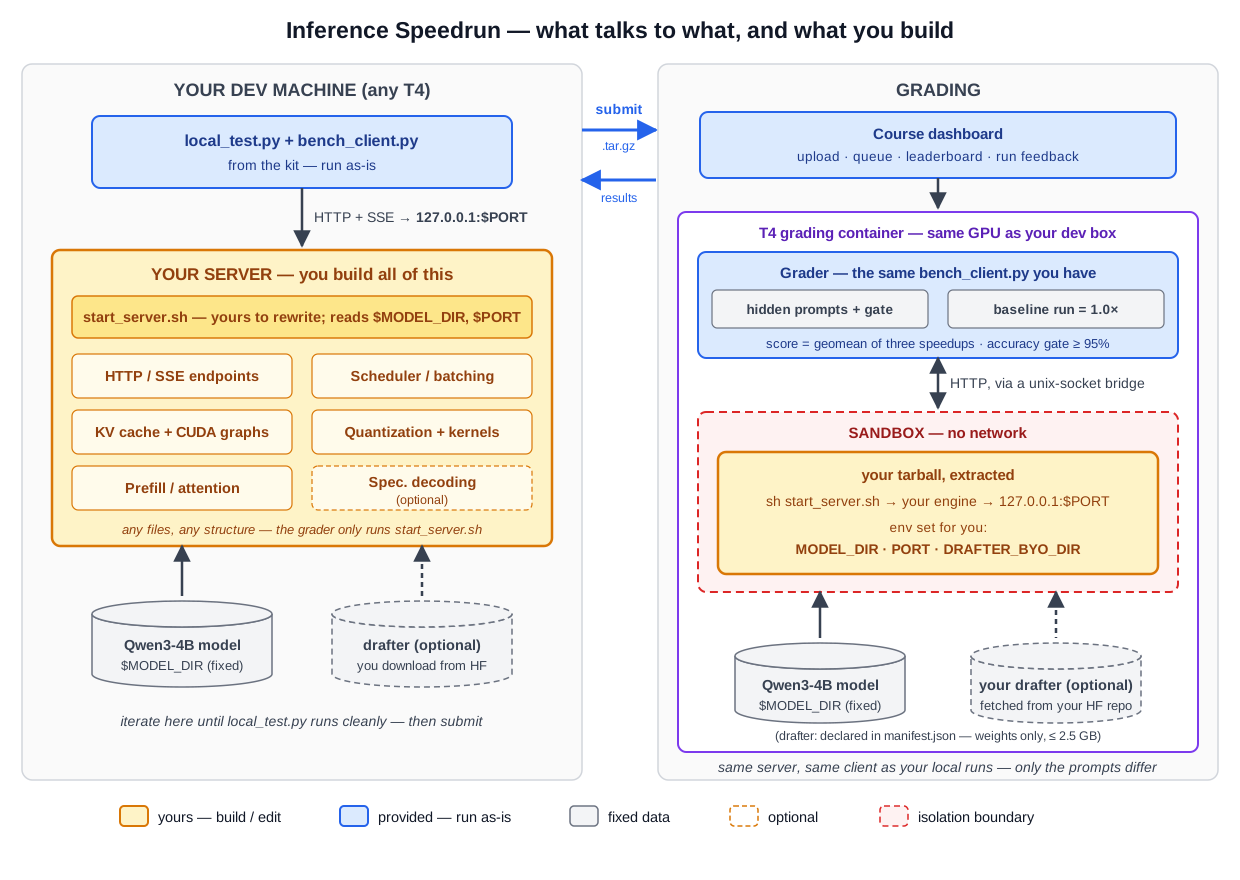
The figure shows both halves of the system. Orange is yours to build; blue components run identically on your machine and inside the grader; the graded path differs from your local loop only in the prompts (hidden, same shapes) and the sandbox around your server.
start_server.shis the whole contract. The grader runs it in a sandbox with environment variables set:MODEL_DIR(the model, read-only),PORT(where your server must listen on 127.0.0.1), andDRAFTER_BYO_DIRif — and only if — your submission declared its own drafter (see Speculative decoding below). It must end up with an OpenAI-compatible server accepting requests; everything it launches is your code.baseline_server.pyis a complete, correct, slow reference: FastAPI handlers, a global GPU lock, and per-requestmodel.generatewith a token streamer. Every one of those choices is deliberate — each is an optimization opportunity, and replacing them in the right order is the assignment.bench_client.pyis the actual measurement code the grader runs — read it to know exactly when the timing clock starts and stops (SSE (server-sent event) chunk arrival, external re-tokenization). There is no hidden methodology.local_test.pydrivesbench_clientagainst your server with public prompts of the graded shapes, so your local numbers are directly comparable to dashboard numbers on matching hardware. To be clear: the measurement method is identical to the grader’s, but the prompts are not — the grader uses hidden prompt sets of the same shape and token budgets (see Part 2). Optimizing against the literal text of the public prompts will not transfer.SPEC.mdstates the API surface, scenario budgets, gate protocol, and scoring precisely; where this page and SPEC.md ever disagree, SPEC.md wins.
Part 2: Optimize
Rebuild the serving stack behind start_server.sh. Your server must keep the API contract (see SPEC.md): GET /health, and POST /v1/chat/completions with streaming and non-streaming responses, honoring max_tokens, greedy at temperature: 0. Everything else, architecture, scheduling, memory layout, precision, kernels, is yours.
How you are measured
The grader fires three fixed hidden traffic patterns at your server (you never implement or configure these; public examples of each shape are in the kit). All timing is external, at SSE-chunk arrival; token counts are re-tokenized from your returned text.
| Scenario | The situation | Metric |
|---|---|---|
| Chat | one user watching a reply stream (250-token prompts, 256-token outputs, sequential). Prompts are a mix of conversational questions, code generation, and step-by-step math — a representative interactive workload. Some optimizations are uniform across these; some are not. | ms per output token (TPOT) ↓ |
| Long prompt | a 4K-token document; the user waits for the answer to start | seconds to first token (TTFT) ↓ |
| Burst | 32 requests arrive at once (128-token outputs) | total tokens/sec ↑ |
Score = geometric mean of your three speedups over the baseline server, measured on the same physical GPU as your run (this cancels hardware differences between grading machines — the baseline is re-measured per GPU, so your ratio is hardware-independent). The baseline scores 1.0×. The instructor reference implementation (CUDA-graph decode + wave batching, no quantization) scores ≈ 2.4×; a strong submission adding quantization, real prefill work, better batching, and speculative decoding has headroom to ≈ 5–8×.
Server startup is untimed (5-minute cap); an optional setup.sh build step gets 10 untimed minutes with no network. Per-scenario wall-clock caps exist at ~2× baseline speed — exceeding one is a TIMEOUT and the run does not score.
The accuracy gate
Before any performance measures, 200 hidden multiple-choice questions are sent through your server under a fixed few-shot, direct-answer, greedy protocol. The unmodified model answers 100% of them; crude int4 round-to-nearest quantization still answers 97.5%. Your run scores only at ≥ 95%. Quantize, fuse, and reorder math freely — serve something that is no longer this model, and the gate catches it. Gate-failing runs are marked INCORRECT and never reach the leaderboard.
Forbidden regardless of the gate: proxying to another model or service (the grading sandbox has no network), canned responses to benchmark prompts (they are hidden), and manipulating timing rather than actual serving speed.
Speculative decoding (optional, advanced)
Speculative decoding is fully legal and the grader reserves an interface for it. A small draft model proposes a block of tokens in one cheap forward pass; your server verifies the whole block with one target-model forward and keeps the longest matching prefix. Under greedy verification the output is bit-identical to normal decoding — so the accuracy gate is indifferent to it — and on a T4, where every decoded token otherwise pays a full read of the model weights, each verified block amortizes that cost across every accepted token.
The grading container ships no drafter — you bring your own. The interface is one environment variable: declare a public Hugging Face repo in a manifest.json at your tarball root,
{ "drafter_hf_repo": "<hf-username>/<repo>", "revision": "<commit sha>" }
and before your sandbox starts the grader fetches weight, config, and tokenizer files only (never code) at that pinned revision, caps the size at 2.5 GB, and mounts it read-only at DRAFTER_BYO_DIR. The repo, revision, and a weights hash are recorded with your run.
Where the drafter comes from is up to you:
- Off the shelf. Published DFlash-style checkpoints exist — e.g.
z-lab/Qwen3-4B-DFlash-b16, a 0.5B block drafter trained for plain Qwen3-4B. Mind the target mismatch: our model is the-Instruct-2507variant, so acceptance rates (and dtype behavior) are yours to measure. - Train your own (hard mode). A drafter trained against the exact
-Instruct-2507target accepts more tokens per block and pays off directly. Training is feasible in hours on the datacenter GPUs you can access through UVA Research Computing (interactive sessions, including Code Server (VS Code), via OpenOnDemand). A self-trained drafter must live in a repo under your own HF account; submitting a drafter trained by another student is a collaboration-policy violation, and the recorded provenance makes it visible.
Local development uses the same interface — download your chosen checkpoint and export DRAFTER_BYO_DIR yourself:
python3 -c "from huggingface_hub import snapshot_download; \
  snapshot_download('z-lab/Qwen3-4B-DFlash-b16', local_dir='drafter')"
export DRAFTER_BYO_DIR=$PWD/drafter
Any modeling code you need must ship as source in your tarball, like everything else.
Fair warning from our own measurements: naive integrations can be slower than not speculating at all — whether it pays depends on drafter cost, acceptance rate, and the prompt’s predictability, and all three are yours to measure. That is precisely why it is the advanced track.
Deliverables
Three deliverables.
1. Submission tar ball (Canvas)
Submit the tar ball at two places:
- through the course dashboard at
http://inferencebench.cs.virginia.edu (campus network or UVA VPN required — build your tarball on your dev machine, copy it to your laptop, and upload from there);
- through Canvas,
the following items:
submission.tar.gz
├── start_server.sh   # required: starts your server on 127.0.0.1:$PORT
│                     #   serving the model from $MODEL_DIR (read-only)
├── setup.sh          # optional: untimed build step (10 min, no network)
├── manifest.json     # optional: your own drafter on HF (see Speculative
│                     #   decoding) — weights never go in the tarball
└── ...               # your engine source (source-only, no vendored wheels)
One run in flight at a time; a full grading run takes ~6–12 minutes and the dashboard shows live phases (gate → chat → long-prompt → burst) plus per-scenario results, your speedups, and a grading timeline. The anonymous leaderboard ranks your best passing run — no submission can hurt your standing, so experiment freely. (Same-GPU paired scoring keeps a lucky-noise outlier small, and rankings within 3 % count as tied anyway.)
Also submit, via Canvas by 11/18 (Week 13): a Opinion+Reflection report (see below). The artifact is due Week 4, before lectures cover most of these techniques — the report is where you look back on that gap.
2. Opinion+Reflection: your personal viewpoint (Canvas)
An Opinion is a short, editorial-style article where an author presents a personal viewpoint, argument, or commentary about an issue relevant to LLM systems. It is not a research paper or technical report; rather, it serves to:
- offer a perspective on technical or societal issues in LLM systems;
- provoke discussion or reflection among the broader community;
- advocate for a particular viewpoint, technique, or approach.
Examples are CACM Opinion articles.
A Reflection is a short writeup where you document how your understanding changed between building and studying. This assignment is deliberately scheduled backwards: you ship the artifact by Week 4, largely by experiment (and with AI assistance), while lectures in Weeks 1–8 then give the formal treatment of the very techniques you used — batching, quantization, attention, speculative decoding. Reflect with both experiences in hand: What did you build that you only later understood? Where did the lectures explain — or contradict — what your measurements had already shown you? What would you do differently now?
One report covers both parts (~3–5 pages total). Submit any time during the semester, but no later than 11/18 (Week 13) (included). There is no required template: Both a single-column format or a two-column format is acceptable. As with a regular academic writeup, please include appropriate references for any claims, methods, or results drawn from prior work.
For the report, only PDF will be accepted.
3. Oral defense (scheduled meetings)
For the third deliverable, see below.
Grading
| Component | Weight |
|---|---|
| Passing the accuracy gate with any speedup ≥ 1.0× | 20 % |
| Speedup milestones (e.g., ≥ 1.5× / ≥ 2.5× / ≥ 4×) | 40 % |
| Oral defense | 30 % |
| Opinion+reflection report | 10 % |
| Leaderboard placement (top-5 bonus) | extra credit, up to +10 pts |
Leaderboard bonus. Extra credit on top of the assignment score (+10 assignment points = +2 % of the course grade at most):
| Place | Bonus (assignment pts) |
|---|---|
| 1st | +10 |
| 2nd | +6 |
| 3rd | +4 |
| 4th–5th | +2 |
- Placement is computed from your best fully-passing run as of the deadline (the leaderboard’s normal semantics). Teams share one bonus.
- Tie rule: speedup geomeans within 3 % of each other count as the same place, and everyone in the tied group receives the higher bonus. (Same-GPU paired grading cancels hardware variance, but run-to-run noise is real; we will not pretend to resolve rankings finer than the instrument.)
- The bonus is contingent on the oral defense: it is scaled by the same defense factor as your speedup score. A chart-topping server its authors cannot explain earns no bonus.
Oral defense. Each individual has a short (~10–15 min) interview after the deadline (W5—W8): describe your architecture without notes, account for your measured numbers against the hardware’s limits (whiteboard), explain any piece of code the instructor picks from your tarball, and predict what happens if a named component is changed — predictions are verified by re-running your stored submission. The defense scales your speedup score: an unexplained fast server scores below a well-understood slower one. Everything in your tarball is examinable, including code an AI wrote.
Policies
- AI assistance for coding: AI coding agents/tools are allowed and expected — this assignment assumes them. You are the engineer of record: you sign what you submit, and the oral defense examines your understanding of every line, however it was produced. Optimizations that sound impressive but do nothing (or hurt) on this hardware are detectable in your submission and are fair interview material.
- AI assistance for report writing: held to a stricter standard than code. The Opinion+Reflection is your viewpoint and your hindsight — that is the entire deliverable, and it cannot be delegated. AI may help you outline, tighten, or copy-edit the text you wrote; it may not generate the argument, the observations, or the reflection. Reports must be grounded in the specifics of your build; generic AI-written commentary about LLM systems contains none of these and will be graded accordingly. You are the author of record.
- Collaboration: discuss ideas freely; code and submissions are individual. Do not share engine code.
- Submission policy: grading runs cost real GPU money, and submissions are queued (one in flight per student). Do not fire off many submissions at once or use the autograder as your debugger. Iterate locally first — make sure
local_test.pyruns cleanly against your server and produces results — and submit only when you believe the solution is ready. Then use the autograder’s feedback on that run to debug, fix locally, and resubmit. - Late policy: per syllabus.